

Unlock Google’s AI Overviews Placement in Google Ads with Special Settings & “AI Max”
You’ve seen them. You’ve probably even clicked on them. Google’s AI Overviews are taking up prime real estate at the very top of the SERP, pushing traditional organic results, and sometimes even ads, further down the fold.
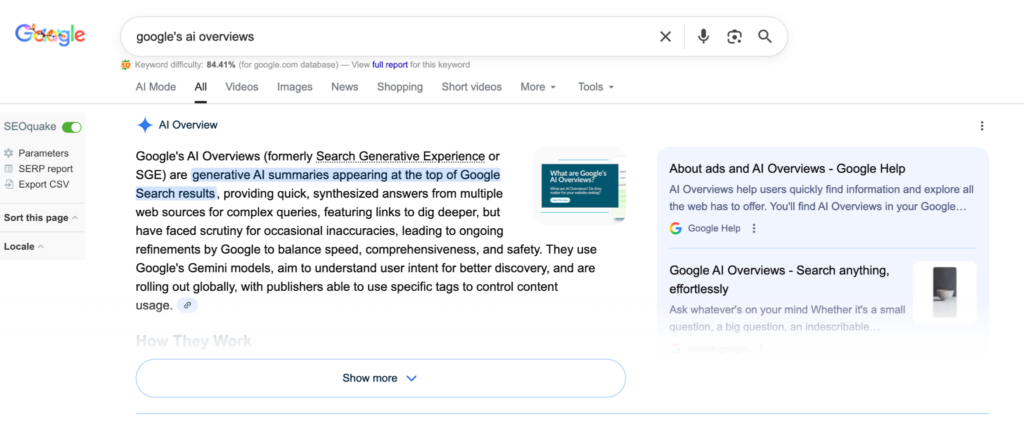
Naturally, you want your ads in that box.
But when you log into Google Ads to find the “Target AI Overviews” checkbox, you hit a wall. It doesn’t exist. There is no campaign type called “AI Overview,” and there is no simple toggle in your campaign settings to force your way in.
Does that mean you have no control? Absolutely not.
While you can’t manually “opt-in” via a single switch, you can signal to Google’s algorithm that your ads are the perfect answer for these complex, conversational queries. Think of this not as a setting you turn on, but as a set of behaviors you adopt.
Here is your guide to the specific Google Ads settings and campaign structures that unlock AI Overview advertising placements.
It’s About “Intent,” Not Keywords
AI Overviews trigger for complex questions — queries where a simple blue link isn’t enough.
Google’s AI is looking for answers, not just keyword matches. If your account is structured rigidly around Exact Match keywords and manual bidding, you are effectively opting yourself out.
To get into the AI Overview with Google Ads, you need to loosen the reins and let Google’s machine learning bridge the gap between a user’s conversational query and your ad.
Here are the specific ad settings you need to look at:
1. Search Campaigns
If you are running standard Search ad campaigns, you are eligible for AI Overviews, but only if you are casting a wide enough net:
- The Setting: Broad Match Keywords
- Why: AI Overviews are triggered by long-tail, conversational queries (e.g., “what’s the best running shoe for high arches if I have knee pain?”). You will never predict every variation of this in an Exact Match list. Broad Match allows Google to match the intent of that complex question to your “Running Shoes” keyword.
However, Broad Match without Smart Bidding is budget suicide.
- The Setting: Smart Bidding (tCPA or tROAS).
- Why: You need AI-based bidding to analyze the millions of signals (context, history, intent) to determine if that specific conversational query is actually valuable to you.
The Feature to Watch: AI Max for Search (Beta as of Q4 2025)
Google is currently rolling out “AI Max” as a feature layer (not a new campaign type) for Search campaigns. It bundles Broad Match, “keywordless” prediction (similar to DSA), and text customization. Check that your Google Ads campaign settings for the “AI Max” are enabled. If you see it, testing this is the single most direct way to tell Google, “I want my ads in AI-generated experiences,” and prepare you for its full launch.
2. Performance Max
Performance Max (PMax) campaigns are, by design, the native habitat for AI placements. PMax is automatically eligible for AI Overviews because it already uses the “intent-over-keyword” logic.
- The Setting to Optimize: Asset Groups (Text & Images)
- The Trap: Many marketers treat PMax asset groups like display ads — short, punchy, sales-heavy.
- The Fix: AI Overviews are informational. Ensure your text assets (Headlines and Descriptions) include answer-based copy.
Use descriptions that solve problems rather than just pitching discounts. If Google’s AI sees that your asset answers the user’s question, you are far more likely to win the placement.
3. Shopping
For retailers, AI Overviews often pull products directly into the answer. You cannot “bid” your way into these slots easily; Google selects products that best fit the AI’s generated response.
- The Action: Enrich your product titles and descriptions in Merchant Center.
- Why: If the AI is summarizing “eco-friendly hiking boots,” and your feed data only says “Boot – Brown – Size 10,” you lose. Add the attributes people actually ask about: materials, use-cases, and benefits.
What You Still Can Control
A common fear is that “leaning into AI in Google Ads” means losing control of where your money goes. While you can’t opt out of AI Overviews specifically without opting out of Search entirely, you do have guardrails.
- Negative Keywords: These still apply. If you don’t want to show up for “free,” “repair,” or specific competitors, add them. AI Overviews respects your negative keyword lists.
- Brand Exclusions: With the new AI Max features and PMax, you can utilize Brand Exclusion lists to ensure that while you are casting a wider net, you aren’t accidentally bidding on competitors or your own brand terms if that’s not your strategy.
How to Get Started with Google’s AI Overviews in Ads
You don’t need to overhaul your entire Google Ads account today to start showing up in AIOs, but you should start testing “AI-ready” ad structures now.
- Select one “Pilot” Campaign: Don’t change everything at once. Pick a campaign with decent volume but not your primary brand defender.
- Loosen the Match Types: Switch ad groups in that campaign to Broad Match.
- Check for “AI Max“: Look in your campaign settings to see if the AI Max beta is available to you. If so, toggle it on for your pilot campaign so you’re prepared for its launch in 2026.
- Review PMax Assets: Audit your asset groups. Do you have “Helpful” text assets, or just “Salesy” ones?. Add descriptions that answer “How,” “What,” and “Why.”
AI is changing Paid Media as we know it — but human management still matters.
Learn more about our AI Optimization Services for Paid Media and our overall stance on the future of search in an artificial intelligence-driven SERP landscape.


![The Big List of PPC Resources and Articles [Updated for 2025]](https://www.greenlanemarketing.com/wp-content/uploads/2021/08/12-768x401.png)