

How to Make a Keyword List: Building a Master Keyword File
When I begin working with a new client, one of my first tasks is to build what I call a Master Keyword File. This is a file I am willing to spend a couple of days putting together because of how impactful it can be for the campaign. While this may vary from website to website, the general goal is to identify:
- The 100 most important “money” pages for the website
- 10-15 of the top keywords per page
- To cast a wide net that includes existing rankings, competitor rankings, and exploratory research
You can also learn a lot about a website by combing through its rankings, including:
- The scope of its offering
- General architecture
- Cannibalization issues
Those are all issues you can set aside to recommend during your technical analysis. For now, back to the Master Keyword File. Your first step is to grab as many existing rankings as possible using a tool like SEMRush or Ahrefs. Once you have that data, the next step is to start narrowing the number of URLs.
The first and biggest swing of the axe will chop off non-money pages.
Deciding on the Top Money Pages
A “money” page is going to be different for every website. For e-commerce websites, they are usually product and category pages. For companies that offer a single product or service, consider support pages like blog posts that are lower funnel. For publishers, consider focusing on more evergreen content. When in doubt – ask the client.
Once you have narrowed your list exclusively to money pages, assuming more than 100 remain, you are going to need to prioritize. You can use Excel formulas to assign a value to each page based on its rankings.
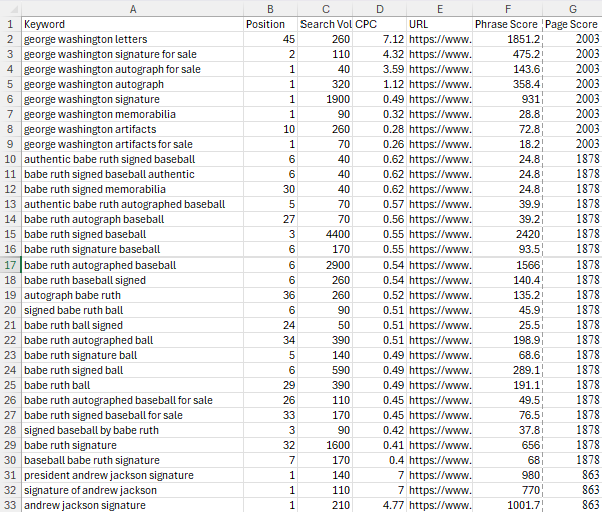
For me, I narrow the spreadsheet to only the following columns:
- Keyword
- Position
- Search Volume
- CPC
- URL
Then I paste this formula into the F column. It assigns a value to each URL based on the total Search Volume and CPC of all the ranking keywords.
=ROUNDDOWN((ROUND(SUMIF($E$2:E$20000,E2,$D$2:D$20000)/COUNTIF($E$2:E$20000,E2),2))*(ROUND(SUMIF($E$2:E$20000,E2,$C$2:C$20000),2))*0.3,0)
This exact formula is only the starting point. You may choose to modify this formula to satisfy your own priorities. Create your own weight system using the existing ranking or keyword difficulty value. Just make sure the formula is consistent for all rows associated with a specific URL.
How to Choose Keywords for Your Website: Deciding on the Top Phrases for Each Page
Once you have prioritized the money pages and removed the lower-value ones from the Master Keyword File, it is time to choose the best keywords and start prioritizing the individual phrases that each of those URLs ranks for. Assuming the spreadsheet uses the same columns in the same order established previously, I recommend applying this formula:
=C2*D2
Or Search Volume x CPC. Again, you can choose to modify this formula to satisfy your own priorities by integrating existing ranking, keyword difficulty, or other metrics.
Sort your spreadsheet by Phrase Value and then by Page Value, and start scanning down the list with your eyes. As you choose keywords for SEO, remove anything irrelevant. Remove anything with questionable user intent. For pages with more than 10 – 15 ranking keywords, remove low-volume phrases as well. This is the most manual and time-consuming part of choosing keywords for SEO, but it can be made more efficient by identifying observable patterns and having a general understanding of which phrase types are conversion-friendly and which are not.
Checking In
At this step, your Master Keyword File should contain up to 100 of the top URLs on your client’s website, each matched with 10 – 15 hand-vetted phrases.
The task still isn’t complete as we need to fill the keyword gap. There are two more steps we need to work through: look for patterns and research competitor keywords.
Look for Patterns
Scan your keyword list with your eyes. It is very likely that pages within the same type rank for keywords that fit a format. For example, if your client is a bookseller, you may find that each page ranks for some combination of “[author name] book,” “books by [author name,” “[author name] novels” and “novels by [author name].”
| Stephen King page | Virginia Woolf page | James Joyce page | |
| Client ranks for… | stephen king books | virginia woolf books | |
| books by virginia woolf | books by james joyce | ||
| stephen king novels | virginia woolf novels | james joyce novels | |
| novels by stephen king | novels by james joyce |
By looking at patterns, we can see “james joyce books,” “books by stephen king” and “novels by virginia wool” are missing, and their value should be explored.
Are any of the pages missing one of these variants? If so, investigate the search volume and see if it would be a fitting addition to your keyword list.
Competitor Keyword Research
Trying to find relevant rankings that competitors have but your client does not can be a tedious endeavor without a proper strategy. Keyword research and competitor analysis is most effective if we can quickly funnel the most relevant phrases to the top by identifying phrases that multiple competitors rank for, but your client does not.
To research competitor keywords, here is what I recommend:
Choose 5 competitors and download their rankings in a spreadsheet from SEMRush or Ahrefs. 4 of them should be very close in scope to your client, meaning that if your client only sells paint, then the competitors should also only sell paint. Since we will only be using keywords that multiple competitors rank for, but the client doesn’t, the fifth competitor can be larger in scope. Its irrelevant rankings will be filtered out.
Once you have all five spreadsheets — six, including your client — it is time to determine which keywords appear in two or more competitor sheets but not in the one for your client. There are a few different approaches to this step.
VLOOKUP and XLOOKUP can accomplish the task using nested IF logic, and many of my colleagues use this approach. However, in my experience, there are too many required conditions, and if a single one gets messed up, you will end up spending a lot of time troubleshooting.
Power Query can accomplish the task, though truth be told, this is a feature that was not part of Excel when I started in the SEO industry, so I learned to live without it.
My solution was to build my own competitor keyword research tool. Unfortunately, the tool is not currently public-facing, and it would take more time than I have right now to make it suitable for public use. The gist of the tool is
- Take the raw client data and raw competitor data and ensure that the only columns in those spreadsheets are the aforementioned Keyword, Position, Search Volume, CPC, and URL in that order.
- De-duplicate keywords within each individual spreadsheet so each phrase is matched only with the highest-ranking page.
- Upload the client data into the tool. The first spreadsheet added is the one that the tool checks the other spreadsheets against, so it is critical that the client spreadsheet is added first.
- Upload the competitor data into the tool.
The tool will then export a spreadsheet showing exactly what we were looking for — keywords that multiple competitors rank for, but your client does not.
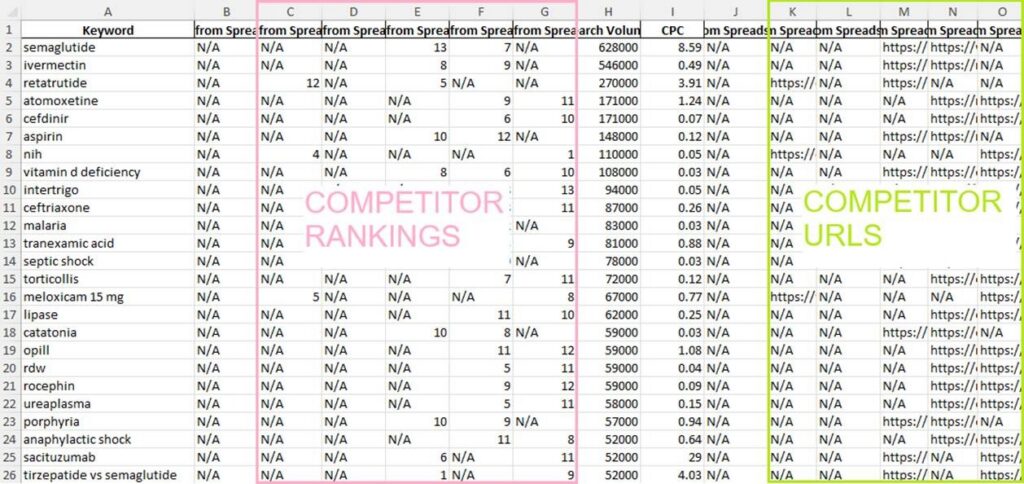
Any keywords that fit existing pages on your client’s website should be integrated into the Master Keyword File. Any keywords that fit your client’s website but for which there is no dedicated page can go into a separate list — the Content Gap — which is a whole different blog post from this one.
Putting It All Together
Once you combine the vetted, existing rankings with the keywords discovered through exploratory pattern recognition and competitor keyword research data, you have completed the Master Keyword File – a robust, prioritized keyword list. Using this file, you will be able to make recommendations for content optimization, devise an internal linking strategy, guide improvements to meta tags or video descriptions, and much more!
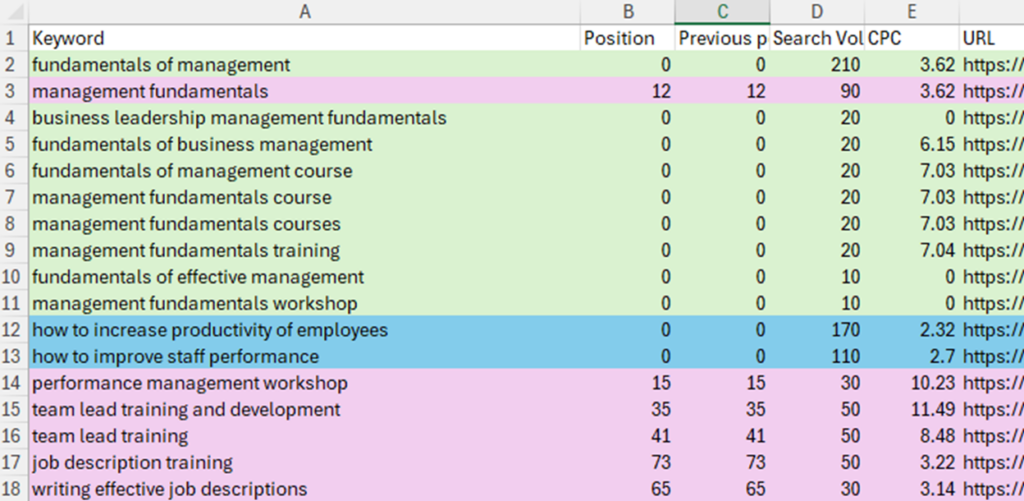
In this snapshot of a Master Keyword File, existing rankings are highlighted in pink, competitor keywords are highlighted in green, and exploratory keywords are highlighted in blue.
Let Us Help with Keyword Research
If you are interested in working with a partner to build a Master Keyword File, if you need guidance on how to do keyword research for SEO, or if you need to improve your content strategy, Greenlane Marketing has an army of experts ready to help.
Contact us today for more information.